


Download TikTok Effect House – Free AR Filter Creator for Windows
Overview: What Is TikTok Effect House?
TikTok Effect House is a free, Windows‑based software application that lets creators design and publish custom augmented‑reality (AR) filters directly to the TikTok platform. Built by TikTok’s own engineering team, the tool combines a visual node‑based editor, a 3D asset pipeline, and a library of ready‑made templates so that anyone—from seasoned VFX artists to hobbyists with no coding background—can craft eye‑catching effects for short‑form videos. The program runs locally on your PC, which means you benefit from faster render times, more processing power, and the ability to work offline before uploading your final effect.
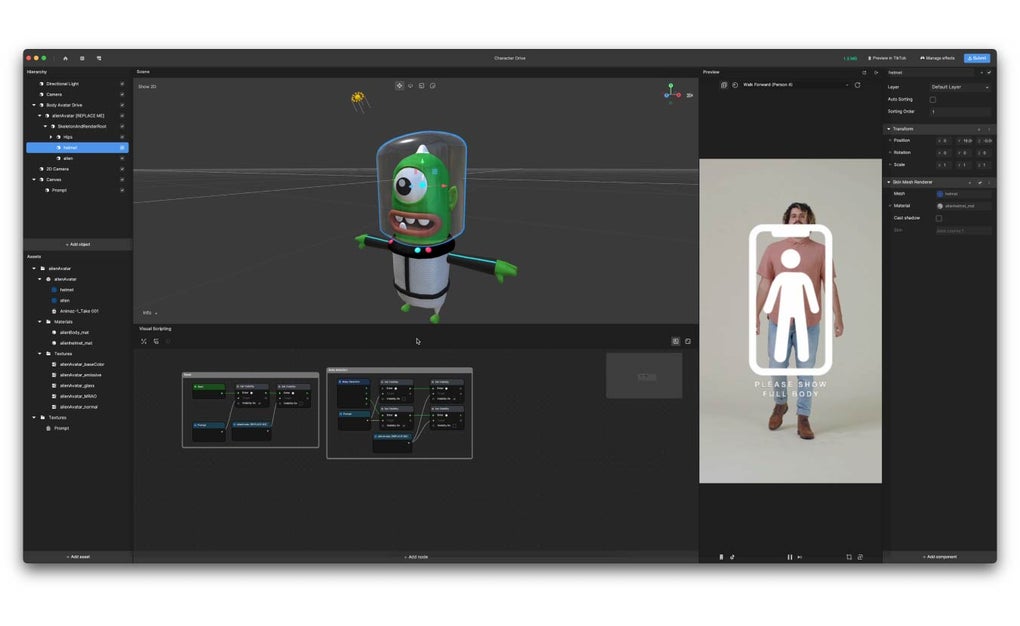
The interface is intentionally intuitive: a central canvas shows a real‑time preview of your filter, while panels on the left host assets (textures, 3D models, particle systems) and on the right hold the node graph that defines the logic of the effect. TikTok Effect House also integrates directly with the official TikTok account, allowing you to test your creation on a connected device, receive performance metrics, and publish the filter with a single click. For creators looking to stand out in the crowded TikTok feed, having a custom filter can dramatically increase video engagement, follower growth, and brand visibility.
Even though the learning curve may feel steep at first, TikTok provides a wealth of tutorials, sample projects, and a community forum where users share tips and troubleshoot common issues. Whether you want to add a simple color‑grade overlay, a sparkling particle halo, or a fully interactive 3D mask that follows facial movements, Effect House gives you the toolkit to turn imagination into a shareable digital experience. In the sections that follow, we’ll explore its core features, walk through installation, discuss system requirements, and weigh the pros and cons to help you decide if this is the right creative app for your next viral video.
Powerful Features That Set TikTok Effect House Apart
- Node‑Based Visual Scripting: Build complex interactions without writing a single line of code. Drag‑and‑drop nodes for triggers, transformations, and animations, then connect them to define the effect’s behavior.
- 3D Asset Integration: Import OBJ, FBX, or GLTF files, apply custom textures, and position models relative to facial landmarks or hand gestures for truly immersive AR experiences.
- Real‑Time Preview on Device: Sync the app with your phone via QR code to see how the filter looks on a real TikTok video, ensuring perfect alignment and performance before publishing.
- Extensive Asset Library: Access a built‑in collection of particles, shapes, sound clips, and pre‑made templates that accelerate development and inspire new ideas.
- Cross‑Platform Export: While the editor runs on Windows, the exported filters are compatible with both Android and iOS TikTok apps, reaching the full TikTok audience.
- Performance Optimizer: Automated tools analyze your effect for frame‑rate impact, suggesting texture compression or polygon reduction to keep videos smooth on mobile devices.
- Community & Tutorial Hub: Official documentation, video walkthroughs, and a user forum provide step‑by‑step guidance for beginners and advanced creators alike.
- Secure Publishing Workflow: Filters are reviewed by TikTok’s moderation team directly from the app, ensuring compliance with community guidelines and reducing the risk of rejection.
Beyond the headline features, TikTok Effect House supports advanced capabilities such as facial expression detection, hand‑tracking gestures, and physics‑based particle simulations. The software also allows you to script custom shaders using a simplified shader language, giving you control over lighting, reflections, and translucency. Because the tool is constantly updated, new features—like AI‑generated masks or integration with TikTok’s latest camera APIs—are rolled out regularly, keeping creators at the cutting edge of social media trends.
All of these capabilities are bundled into a single, free download, making TikTok Effect House one of the most cost‑effective AR development platforms on the market. Whether you’re a marketer aiming to launch a brand‑specific filter campaign or a TikTok influencer looking to add a signature visual flair, the feature set provides enough depth to grow with your ambitions.
Step‑by‑Step Installation & First‑Time Usage Guide
Getting TikTok Effect House up and running on a Windows PC is straightforward, but following the correct steps ensures you avoid common pitfalls like missing runtime libraries or incompatible graphics drivers.
1. System Prerequisites
Before you download, verify that your computer meets the minimum requirements:
- Operating System: Windows 10 (64‑bit) or later.
- CPU: Quad‑core Intel i5 or AMD Ryzen 5 equivalent.
- GPU: DirectX 12 compatible graphics card with at least 2 GB VRAM (NVIDIA GTX 1060, AMD Radeon RX 560, or newer).
- RAM: 8 GB minimum, 16 GB recommended for complex 3D assets.
- Disk Space: 2 GB free for the application and additional space for assets.
2. Download and Install
- Visit the official TikTok Effect House website and click the “Download for Windows” button.
- The installer (EffectHouseSetup.exe) will be saved to your Downloads folder. Run the executable with administrator privileges.
- Follow the on‑screen wizard: accept the EULA, choose an installation directory (default is C:\Program Files\TikTok Effect House), and let the installer copy files and configure shortcuts.
- After installation, the program may prompt you to install the latest Visual C++ Redistributable and DirectX runtime. Accept both; they are required for the 3D rendering engine.
3. First Launch and Account Connection
When you open Effect House for the first time, you’ll be asked to sign in with your TikTok account. This step links the editor to your creator profile, enabling you to test filters on your phone and submit them for review. If you don’t have a TikTok creator account, the app will guide you through the registration process.
4. Creating Your First Effect
- Choose “New Project” from the welcome screen. Select a template (e.g., “Face Mask” or “Particle Trail”) to start with a pre‑configured node graph.
- Import any custom assets you wish to use by dragging them into the Asset panel. Supported formats include PNG, JPG, OBJ, FBX, and GLTF.
- Use the node editor to connect triggers (e.g., “On Blink”) to actions (e.g., “Spawn Particle”). Adjust parameters such as size, speed, and color in the property inspector.
- Click the “Preview on Device” button. A QR code appears; scan it with the TikTok app on your phone. The live preview shows how the effect behaves in real time.
- When satisfied, click “Publish.” The filter enters TikTok’s moderation queue, typically reviewed within 24‑48 hours.
Throughout the workflow, the bottom console logs warnings and suggestions, helping you optimize performance before publishing. If you encounter errors, the built‑in Help menu links directly to the online tutorial library, where you can search for solutions by error code.
Compatibility, Pros & Cons, and Frequently Asked Questions
Compatibility
TikTok Effect House runs exclusively on Windows 10 (64‑bit) and newer versions. The filters you create are automatically compatible with TikTok’s Android and iOS mobile apps, meaning you don’t need separate builds for each platform. For creators using macOS, a Windows virtual machine or dual‑boot setup is required, as there is currently no native macOS version.
Pros
- Free to use: No subscription or hidden fees, making it accessible to hobbyists and small businesses.
- Robust AR capabilities: Supports face tracking, hand gestures, 3D models, and particle systems.
- Real‑time device preview: Immediate feedback on how the effect appears on a phone.
- Extensive learning resources: Official tutorials, community forum, and sample projects.
- Direct publishing pipeline: Seamless submission to TikTok without third‑party tools.
Cons
- Windows‑only editor: No native macOS or Linux version, limiting accessibility for some creators.
- Steep learning curve for advanced features: Node‑based scripting can be intimidating for beginners.
- Hardware demands: Complex 3D effects require a decent GPU and RAM for smooth performance.
- Review delay: Published filters undergo TikTok moderation, which can take up to 48 hours.
- Limited offline collaboration: No built‑in version control or team editing tools.
FAQ – Frequently Asked Questions
Is TikTok Effect House really free?
Yes. The software can be downloaded and used at no cost. TikTok only charges if you run a paid promotional campaign for a filter, but the creation and publishing process itself is free.
Can I use Effect House on a Mac?
The official editor is Windows‑only. Mac users can run it through Boot Camp, a virtual machine (e.g., Parallels), or by using a Windows PC.
Do I need programming knowledge to create filters?
No. Effect House’s node‑based system lets you build logic visually. Basic filters can be made by dragging pre‑made nodes. However, advanced effects may benefit from a basic understanding of 3D concepts and shader principles.
How long does TikTok’s review process take?
Typically 24‑48 hours. Simple filters are approved faster, while complex or brand‑related effects may undergo additional checks.
Can I update a filter after it’s published?
Yes. You can create a new version of the effect in Effect House and submit it for review. The previous version will be replaced once the new one is approved.
Conclusion & Call to Action
TikTok Effect House delivers a powerful, free solution for anyone who wants to stand out on the platform with custom AR filters. Its node‑based editor, real‑time preview, and seamless publishing workflow make it a compelling choice for creators of all skill levels. While the Windows‑only requirement and hardware demands may pose challenges for some, the breadth of features and the support ecosystem more than compensate for those limitations.
If you’re ready to transform your TikTok content with eye‑catching effects, the first step is simple: download TikTok Effect House today, follow the quick installation guide, and dive into the tutorials. Within a few hours you could have a signature filter that drives engagement, grows your follower count, and potentially opens doors for brand collaborations.
Download TikTok Effect House now and start creating the next viral AR experience!







